

Category: Blog Post

Best Ways to Distribute Keys for Your Indie Game

Your game is finished, it’s a few weeks until launch day, and you’re eager to get a few codes into the hands of willing creators who will not only love it, but also share it with their audiences. The question is: how do you do that effectively and without breaking the bank? In this post, we cover the best budget-friendly ways to distribute keys for your indie game.

Email Campaigns

The days of cold emailing are far from dead, and remain one of the most effective ways to connect with creators who might be interested in covering your game. However, to run an effective email campaign, you want to ensure you’re targeting creators and press who have covered titles with themes and mechanics similar to yours. For example, you might be developing a roguelike game, but that doesn’t mean every roguelike creator is going to want to play it.

  • Learn Your Subgenres: Start by pinpointing sub-genres within your title, and then create a list of prospects who seem to enjoy them.
  • Draft Your List: Once you’ve homed in on the finer details of your game, and found a few comparable titles, you can begin drafting your list.
  • Spend Your Time Wisely: Start with 25-50 creators, and expand from there. The list can be as long as you like, but as you get deeper into the trenches of the creation world, targeting grows more difficult. Spend your time wisely and do your best to pick the optimal targets for the job.


Locating Targets

The easiest way to locate strong targets is to head to the YouTube search bar and type in the names of the comparable titles you compiled earlier. You’ll have to do a bit of scrolling, and manually check each creator’s pages to ensure they’re a decent fit, but once you’ve confirmed they are, snag their email and add it to your list.

Once your list is ready, prepare a good pitch, and get ready to press send. Remember, it’s often better to ask if they want a key in your initial pitch, rather than including it in the first email. This will ensure your game doesn’t end up on key-selling sites and encourages an open line of communication between you and any creators you’re working with.

Social Media

Marketing your game on social media can be one of the most cost-effective ways of getting your title in front of thousands of eyes. That said, it can also be time-consuming and sometimes with little reward if you approach it without a proper strategy. This blog post isn’t going to touch on the nuances of best social media practices, but it is worth mentioning that hosting key campaigns on social sites can lead to dozens of high-value creators who would otherwise never have discovered your title. Usually, those who are on sites like X or Bluesky are tuned into the indie game development feeds and use them as genuine ways to discover new titles. Rather than mindlessly scrolling through Steam pages or release calendars, they prefer a more organic exposure route and one that is served alongside their other daily content consumption.

If you’ve already put in a bit of time and effort into growing your own presence on social media, you can leverage it when it’s time to distribute keys.

  • Create an Eye-Catching post: Put together a post with a few photos of the most interesting parts of your game.
  • Include a Call-to-Action: Encourage interested creators to share a comment if they’d like to play it early.
  • Exclude Links: We’ve found that posts tend to perform worse when a link is included. Your images and game title in the body of the post should spark enough interest to get creators over to Steam.


Now comes the tricky part. Once you have a list of comments a mile long, you’re going to have to filter through each of these targets to ensure that the person on the other end of it is, well, a real person.

  • Filter Through Each Profile: Start by viewing each profile and searching for their relevant content links. If they don’t have any, it’s better to skip.
  • Streamers: If they’re a Twitch streamer, you can use sites like SullyGnome to find their average CCV (concurrent viewers) and evaluate how effective a target they are.
  • YouTubers: Platforms like YouTube speak for themselves in terms of viewership as you can view their recent videos and live streams to gauge their average viewership.
  • Find Their Email: After evaluating whether you think their content is strong enough to offer a key to, track down their email address and add them to your pitch list.


New to social media? Check out our previous blog post, “Getting started with Bluesky and X”.

Key Distribution Websites

If you’d like to explore options that are a lot less manual, save you a ton of time, and are incredibly cost-effective, we’d highly recommend websites like PressEngine. This site, and others like it, help streamline the distribution process and make evaluating critical targets all around easier. The best part is, PressEngine offers free accounts for indie developers that will allow you to distribute keys.

PressEngine

This site in particular offers the best free option, giving you the ability to handle an unlimited number of key requests. Simply upload your title to the platform and open it up for creators to request to cover it directly. The site also offers a lot of discoverability, as once you’ve added your title, it will automatically be placed in their game database for creators and media to come across. The free plan doesn’t cover things like outreach though, so if you’d like an easy way to send out an email blast and get your title in front of thousands of verified media and creators, then it’s worth exploring their lite plan.

Regardless of whether you choose one key distribution site or multiple, platforms like these tend to be the most time-saving way to get your game in front of thousands of strong targets, and require very little footwork from you.

Closing Thoughts

We know just how exhausting this last bit of marketing can feel after you’ve spent months or years developing your game, and while you can save a lot of money doing it yourself, hiring a marketing team to handle it can eliminate a world of stress. This is one of the things we do best at Starfall PR, so if you’d like to hard focus on the ‘launch your game’ button without the headache of key distribution for media and creators, then be sure to reach out to us and we’ll craft a marketing plan that fits the scope of your indie game and your budget.

To those handling it themselves, we hope this article gave you enough insight to get you started, and we wish you the best of luck with your launch!


Understanding Steam’s Popular Upcoming

‘Popular Upcoming’ is a coveted phrase in indie game marketing. The extra visibility on Steam’s homepage can be the difference between a good launch and a great launch, but how do you guarantee your spot among the AAAs, indie darlings, and viral overnight sensations? Thankfully, we’ve covered everything you need to know about Steam’s greatest marketing tool.

What Is Steam’s Popular Upcoming List?

Steam’s homepage features a number of lists to direct consumers to new games and assist titles with discoverability. These lists include New & Trending (recently launched games with high sales velocity), Top Sellers, and the coveted Popular Upcoming. The latter is a list of the 4,000 most-wishlisted games on the platform with an imminent release date.

How is Popular Upcoming Determined?

As mentioned, the top 4,000 most-wishlisted games will appear on Popular Upcoming. While there isn’t a specific wishlist target to guarantee your spot on the list–since the total number of games on the platform varies daily and can increase competitiveness–5000-8000 wishlists is a fair estimate to reach the threshold for inclusion.

From there, your placement on Popular Upcoming is determined by the game’s public release date and time. A game releasing at 9:00 will appear higher on the list than a game releasing at 19:00, and titles usually stay on the list ~30 minutes after launch. Differences in wishlist count will not affect your order in Popular Upcoming, only your inclusion. From there, the games disappear to make room for more upcoming titles.

The Exceptions

There are some exceptions to earning your spot on Steam’s Popular Upcoming chart. While the region and demographic information doesn’t impact your chances, Steam will not count wishlists from bot or spam accounts towards your total for the list. Wishlists earned through organic Steam page traffic–such as organic discoverability, clicks from an article or YouTube video, or an ad campaign–will count. Purchasing wishlists via third-party means, however, may be flagged on their side and will not.

Bot wishlists are in the minority of the wishlists you will receive, but if something seems too good to be true (i.e., someone proposing a one-time payment for a guaranteed number of wishlists), it likely is. Our team is highly experienced running campaigns with the goal of Popular Upcoming, but we also have resources available for developers looking to get started on marketing themselves.

Why Does It Matter?

Understanding how Popular Upcoming works is one thing; understanding why it is important is another.

When your game reaches Popular Upcoming, it is guaranteed a spot on Steam’s homepage ahead of launch. The length of time a game spends on the homepage varies by the amount of other titles launching at/around the same time, however that extra visibility is coveted. For players intentionally seeking out the Popular Upcoming list for new recommendations, your game may catch their attention. For casual browsers toggling through the list, maybe your game’s key art or genre tags will launch a new obsession. As opposed to directly marketing your game via exclusive ad campaigns or targeted content creator videos, Steam’s Popular Upcoming places your game in front of everyone visiting the store, allowing for maximum visibility when it matters. Our partners have nearly doubled their wishlist count by appearing on this list alone!

How Do I Get There?

With the algorithm data in mind, how do you reach this wishlist threshold for your indie game?

Thankfully, our team has compiled a number of resources to help you reach your wishlist goals. From optimizing your storepage and capsule art to managing a successful creator campaign, we’ve covered the most valuable marketing activities that can get your game seen.

Feeling overwhelmed about it all? Starfall PR is happy to create a bespoke campaign for your game to reach Popular Upcoming and beyond.

Image from magnific.

Building a Community For Your Indie Game

When you start marketing your indie game, you’re going to hear the term ‘target audience’ everywhere. Your target audience is your core group of players. Indie games don’t survive on mass virality; they thrive on loyal niches. In order to earn your place, you need to intentionally build a community around your game. Think of it like moving into a new neighborhood: No matter how many friends you made before moving, you still have to introduce yourself, meet your neighbors, and make new friends. That’s community building.

Where Do I Build My Indie Game’s Community?

The list of platforms you engage with can expand over time. It’s best to start with what you’re capable of maintaining. Your content across platforms doesn’t need to be vastly different for the sake of uniqueness, but it does need to fit the general purpose of the platform you’re posting on.

Platforms:

  • Discord – Your long-term home base. This is where you can provide updates, hear valuable feedback, run polls, and gather organic input from your community. Players can connect here more intimately than on other social platforms. Create clear channels that guide engagement and use bots to automate moderation and support.
  • Instagram & Facebook (Meta) – Ideal for visual content and networking. Use Meta Business Suite to post efficiently and stay consistent.
  • Bluesky & Twitter/X – Great for visibility and conversation. Share short clips, screenshots, and engage regularly. For a more in-depth explanation, check out our “Getting Started on Bluesky and Twitter” blog.
  • YouTube – Your trailer home base. Even posting Shorts consistently can improve discoverability.
  • Reddit – Find your niche through relevant subreddits. Participate before promoting.
  • Wildcard Platforms (Tumblr, etc.) – If you already have an audience somewhere, leverage it.


When Should I Start Building My Community?

As you begin to develop your game, you can start gathering screenshots and gameplay clips. Content is how you introduce your game and yourself to your community. Before you post anything, decide how you want your game to be seen. Is your brand chaotic and funny? Transparent and dev-log focused? Looking at how other indie developers present their games can help you spot patterns, but the goal isn’t to copy them; it’s to understand what works and shape your own strategy.

Start with a foundation. Attention spans are short, so preparation matters. Know what makes your game interesting. Have a backlog of content ready. Decide how often you can realistically post on social platforms. Consistency will build more momentum than chasing every viral trend you see, and it’s less likely to burn you out.

Most importantly, remember that community building isn’t just broadcasting. On nearly every platform, engagement matters as much as creation. Comment, respond, follow, post. Platforms reward interaction, not just output. The more you act like part of the community, the more your game becomes visible within it.

How Do I Manage Engagement And Stay Consistent?

Most platforms provide built-in analytics. Likes, views, comments, and shares aren’t something to obsess over, but they do provide useful signals. They tell you what’s resonating and what isn’t. If your metrics feel stagnant, experiment: adjust your posting times, refine your hashtags, or improve the visual quality of your content. Small tweaks can create noticeable shifts.

If managing multiple platforms starts to feel overwhelming, consider using a scheduling tool. Platforms like Sprout Social or Buffer let you draft and schedule posts in one place, so you can focus on engaging with your audience instead of constantly publishing posts manually.

Jumpstarting your game’s digital footprint is a great way to carve out a corner of the internet where niche groups can discover your work and follow your journey. By sharing your process and inviting people to see what you’re working on, you’re taking the first steps to intentionally build a community that will stick with you through launch. If you need help with logistics, reach out to Starfall PR below or through our contact page. We can create posting schedules, help you find a target audience, evaluate current engagement, and offer industry knowledge.

Image by freepik

Optimizing Your Steam Store Page

Your Steam store page is more than just a simple storefront. Behind the trailer, screenshots, and text is an algorithm collecting data. Taking steps to be on the right side of this algorithm ensures your game will be shown to a relevant audience and can net you hundreds, if not thousands, of wishlists you may miss out on otherwise. In this guide, we’ll walk you through optimizing your Steam store page, from each component’s importance to the algorithm and potential buyers, and what you can do about them.

Not a Magic Bullet

To preface, we need to be clear that optimizing your Steam store page is not a trigger for instant success. Instead, think of it as a multiplier to your game’s quality and potential. Playing to Steam’s algorithm will ensure your game is given the best shot possible at reaching your audience, but it cannot make up for anything that may be lacking or miss the mark with players. Take a good hard look at your game first before you begin marketing it. It’s better to set off on the right foot than it is to course-correct later.

Store Page Assets

A picture is worth a thousand words. From your game’s capsule art to screenshots and trailers, these assets are critical marketing tools that make up a player’s main store browsing experience. This window to attract is short, however. Most people make snap judgments after spending 30 seconds or less glancing through everything, so make them count. Catching the right attention here can lead to clicks into your game page, an important data point for Steam’s algorithm.

  • Capsule Art – This is the first thing players see as they browse Steam. Consider if yours communicates the gameplay in a visually pleasing way. What’s popular now is a large visual (like a person) on one side of the capsule, and the game name on the other. Learn more about how to approach your capsule art in our post about the marketability of capsule art.
  • Screenshots – Your first four screenshots are the most important– they’re what Steam shows when hovering over a game in the store. These screenshots need to be informative and show players exactly what they can expect when playing the game. What does the UI look like? What is the genre? What content is there? Is there variety? You can and should add more screenshots to your page, but spend the most time curating your first four.
  • Trailers – Cinematics are cool, but will not sell your game. People browsing on Steam are on the prowl to buy or wishlist, so their main priority is understanding how a game will play. The first trailer on your store page should jump straight into gameplay and showcase features that will motivate buyers. You can have fun with your second trailer, but your first trailer is what starts playing as soon as someone clicks into your page and is used throughout the Steam store when browsing.


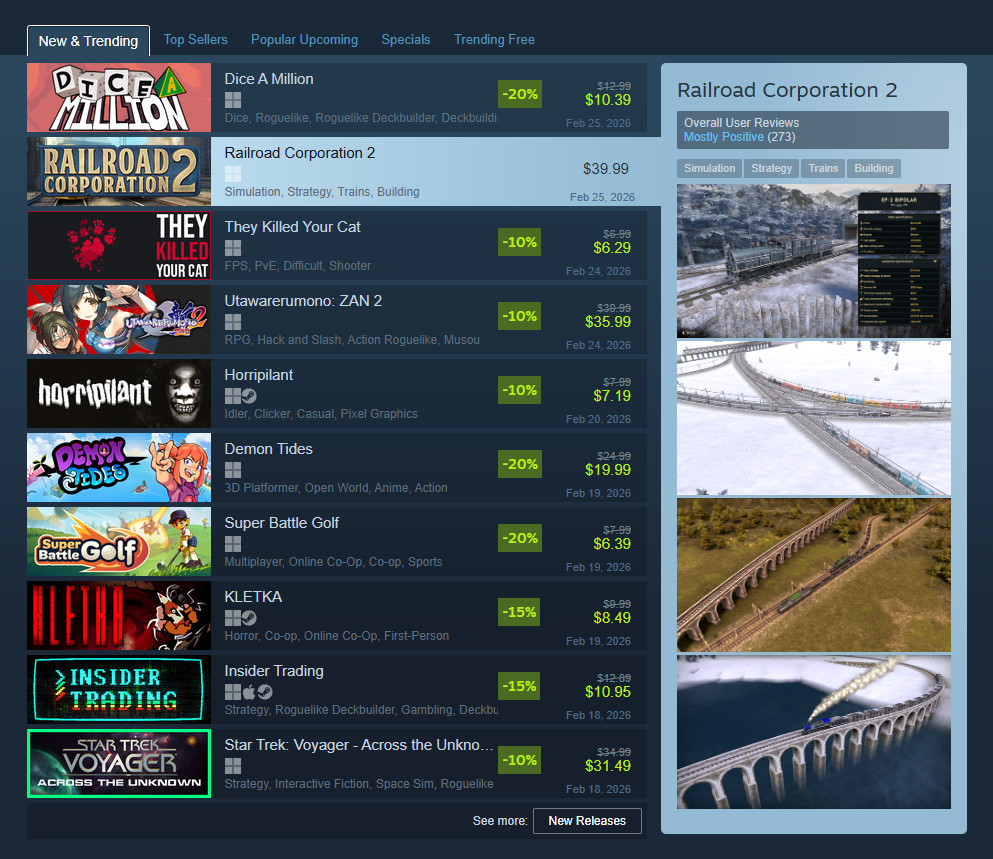
Steam will showcase the first four screenshots of a game while browsing. Take advantage of this and show off what your game has to offer.

Store Page Text

While a picture is worth a thousand words, your store page text is needed to communicate exactly what your game’s all about. As the video game industry grows more and more competitive, players are becoming pickier and know exactly what they want. The right keywords in your description can change a “maybe” to “I need this”.

  • Short Description – This sits underneath your capsule art on the store page, and makes appearances throughout the Steam store. Use this blurb to get to the core of what your game is and make it interesting. Think about it like an elevator pitch: What are the genres? What’s the in-game motivator? Don’t be afraid to adjust your tone to match the feeling of the game, but don’t let it get in the way of your message.
  • “About The Game” – It’s easy to think you can just dump a bunch of information here and forget about it. You can’t. Going the extra distance and crafting a pleasing “About” section will make a difference. Study what similar games do. Add visual headings, gifs that showoff whatever feature you’re talking about. Cover the most important stuff first. Avoid a dense wall of text, break up your information, and add bullet points when it makes sense to. Don’t forget to update this as you add new mechanics to the game!


Notice the blurb shown in this game preview while browsing. Steam will pull additional relevant info from the store page.

Store Page Game Info

Compared to your store page assets and text, game info is only interested in what your game is, not what it’s about. What genre is it? Is there accessibility support? Controller support? What languages can I play in? These are the things players will initiate and filter their searches by, and plays a major part in who Steam’s algorithm will recommend your game to. 

  • Tags – These affect the algorithm the most and are critical to get right. Steam uses your tags (primarily the top 5) to determine similar games and recommends them to fans of those genres through their Discovery Queue, “Is this relevant to you?” section on store pages, “Because you’ve played games tagged with…,” when browsing, and more. Peek the “More like this” section at the bottom of your game page to see if you’re on the right track and learn more about how tags work here on Steamworks
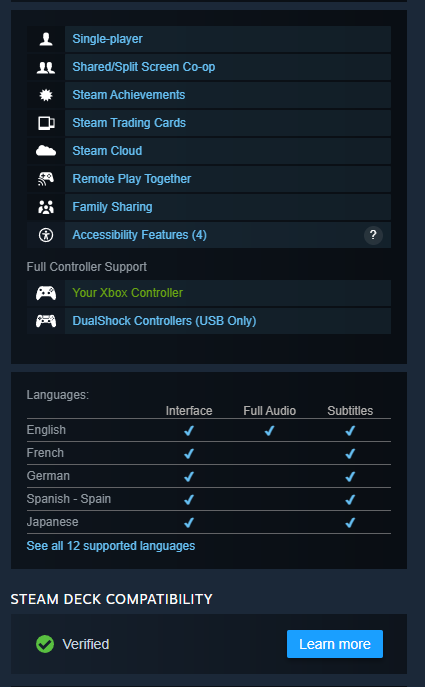
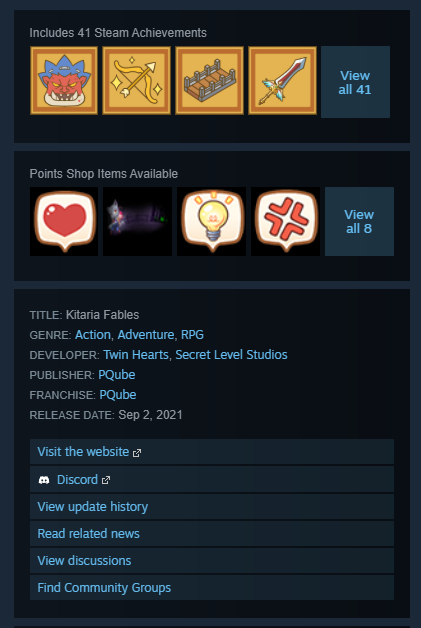
  • “Basic Info” – Littered throughout your game’s backend are little sections you can edit that add additional information about your game. Steam takes this information and packages it neatly into your right-hand sidebar for players to quickly peruse through. This includes things like controller support, accessibility features, languages supported, and more. At the bottom of each store page is also a “System Requirements” section. Players are becoming more and more conscious about how games will perform on their systems, so don’t overlook filling this out.


Two snippets showing the additional information displayed in your sidebar.

Final Thoughts

Optimizing your Steam store page is an overlooked but important part of marketing your game. Steam’s store algorithm is an incredibly powerful tool to have on your side, so don’t neglect spending the time to test and improve your page. As you look to make changes, keep in mind the tips offered here to make sure you’re putting your best foot forward. 

Just getting started with marketing your game? Check out our previous blogs on effective marketing strategies, and how to get started with pitching your game to creators. If you’re looking for a more guided and hands-off approach, Starfall PR is here to help! View our case studies to learn more about what we can do for you, and contact us to get started!

Getting started with Bluesky and Twitter

In previous posts, we’ve recommended social media as a cheap and effective way to reach your game’s audience. Recently, Bluesky has emerged as a popular social platform within the game industry thanks to its ease of use and focus on discoverability and engagement. New opportunities for your game to strike it big on social media come with a new social platform. Understanding the correct approach, though, is critical to maximizing your results while minimizing effort. Whether you’re launching a new Bluesky page or need tips to increase engagement on an existing page, we have a few tips to help get you started.

Starting Your Account

If you’re beginning with a fresh page, updating your profile as soon as possible is essential. Add your logo as a profile image, and choose a stylish header to tie it together. Make sure your images fit the sizing guidelines. Otherwise, they’ll appear stretched or blurred, giving a low-quality look to your account. Spruce up your bio with a few sentences about your studio or project, and include your best contact information.

If you’re deciding between styling the account for your studio versus your game, ask yourself what you’d like to achieve with your page. If you’re planning to produce multiple projects, forming the account under your studio means the following will carry over to your next games. If this project is a one-off or the genre will differ significantly from future projects, then structure the page around your game.

Who To Follow

One of the most overlooked aspects of social media marketing is curating the accounts you follow. Applying a strategy to the accounts you follow can kickstart your profile with its first few dozen followers.

Consider who your audience is. Do you want your posts to reach content creators? Publishers? Journalists, or other indie game developers? Ask yourself these questions, and begin following these accounts from your profile. Each person you follow will receive a notification, often earning you a new follower! We recommend following between 400 and 500 accounts to get your page off the ground. You can always unfollow people you’re not mutuals with.

Gaining New Followers

Followers are a valuable resource for 2 reasons:
‎ ‎ ‎ ‎ ‎ ‎ – They’re more likely to engage with your posts.
‎ ‎ ‎ ‎ ‎ ‎ – Higher follower numbers make your page appear more ‘legitimate’ or reputable.

Producing relevant and high-quality content is the easiest way to earn new followers. You can also gain followers by following new accounts, as stated above. The first 100 followers are the hardest to earn, so prioritize following new people and engaging with their posts to get the account off the ground. Moving forward, popular hashtags and healthy engagement will keep this follower number growing!

What To Post

The most challenging hurdle to overcome: what should I post? No two games are exactly alike, so that each strategy will differ slightly. Thankfully, there are a few common themes that apply to most projects:

  1. Introduce Yourself
    Your first post should be an introduction to the account. Whether you’re promoting your studio’s backlog or a specific game, your first post should indicate who you are and what you’re working on. We advise ‘pinning’ your post to the top of your profile so it’s the first thing visitors see. This introductory post will serve to orient them to your brand. Twitter and Bluesky limit your character use, so this post should be short and effective. To save space, link your Steam page in the replies of your post.Here’s an example post for a fictional game titled Sea Glass:
    Introducing Sea Glass, a casual puzzle game coming to Steam! Collect sea glass along the shore and arrange these unique shapes to form a picture. Sell your creations in local shops to purchase upgrades for your business, like decorative frames, templates, and dyes to unlock new colors!
  2. Leverage Assets
    Social media is highly visual, so leveraging assets is crucial to your post’s success. On text-based platforms like Twitter and Bluesky, it is essential to include an asset with every post you publish. Assets include video clips (trailer, gameplay, devlog), screenshots, concept art, GIFs, and photographs. Adding media helps your post stand out and gives people a taste of your project, even if they don’t read the text.
  3. Follow Trends
    Thankfully for indie developers, trends are a huge part of promoting your project on social media, offering solid guidance on your posting schedule. A few trends happen weekly and rely on hashtags, so as long as you tag your post, you’re included!
    ‎ ‎ ‎ ‎ ‎ ‎ – #trailertuesday: Post footage or a link to your trailer
    ‎ ‎ ‎ ‎ ‎ ‎ – #wishlistwednesday: Encourage wishlists for your game through an original post, or by interacting with another #wishlistwednesday post
    ‎ ‎ ‎ ‎ ‎ ‎ – #followfriday: Encourage new followers with this tag
    ‎ ‎ ‎ ‎ ‎ ‎ – #screenshotsaturday: Post screenshots of your game
    Dozens more tags target specific genres (such as #turnbasedthursday or #turniptuesday), but the above represent an applicable list to any game.


There’s more strategy to social media, but the above paints a broad overview for success on the platform. If you’re feeling overwhelmed, try planning your posts using the Twitter or Bluesky scheduling tool. If you need more advice on getting started or reviving an old account, Starfall PR is always here to help. Contact us through the form below or on our contact page.

Photo by Pixabay: https://www.pexels.com/photo/like-printed-on-brown-wooden-scrabble-267355/

Pitching Your Game to Creators: A Guide for Indie Game Developers

Once your game is in a state where you believe it is ready to be shared with the public, you can consider content creator outreach. Pitching your game to creators can help expand your reach, introduce it to wider audiences, and connect it with more targeted communities. Before you start this process, ensure that your game build is stable, free from critical gameplay interruptions, and offers a smooth, memorable experience overall. When you’re ready, here are some best practices to effectively market your game, allowing for better engagement with content creators and their audiences.

Build a Strong Target List

Identifying the right creators is crucial. Finding relevant targets will increase the likelihood that these creators will bite and cover your game. When choosing which platforms to prioritize, we always recommend YouTube over Twitch. Content posted on YouTube is considered evergreen, meaning that viewers can discover and revisit the content well after it is first uploaded. Getting a streamer to cover your game is still beneficial, as they may post VODs and clips on YouTube later, but it can be a bit more timing-dependent. To determine who qualifies as a relevant target, consider the platforms they use, their size, and their activity.

Here are some things to consider as you build your list:

    • Identify which games the creator’s target audience is familiar with. Creators who have already shown an interest or have been following your game are great starting points. However, make sure to expand your search to include creators who cover games similar to yours and align with the overall theme or niche of the channel.
    • What are the creator’s recent videos about? Take the time to review the creator’s uploads to understand the current state of their channel. In your initial search, a target may seem like a good fit, but after a closer look, you might discover that their channel has shifted focus.
    • Have they maintained a consistent posting schedule and viewership level over the past few months? Include larger and smaller channels in your outreach list based on your marketing goals, but always double-check their recent view counts. Avoid creators who have been inactive for months, as you’re unlikely to see coverage, let alone receive a response from them.


Writing Your Pitch

In your pitch, it’s essential to make your intentions clear by starting with an introduction of yourself and/or your studio. Always state the purpose of your outreach, whether it’s to invite them to try a demo, experience an early preview build, explore major updates, or write a review. In the subject line of your email, highlight the offer and dial in on the key selling points of the game, such as the genre or notable features, and incorporate relevant keywords to attract the intended audience.

Keep the following in mind as you write your pitch:

    • Create a Mutually Beneficial Connection (Most Important): Look for ways to connect your offer with their interests through your hook. How can your offer personally benefit them? Maybe similar games have performed well on their channel. Maybe there are certain features that really resonate with them. You can even make it exclusive if you can offer an early build before a public release.
    • Keep your pitch short and sweet: Follow your introduction with a 2-3 sentence paragraph that gives creators an idea of what to expect from the gameplay loop and some of its most exciting features. Creators receive a lot of pitches, so it’s always smart to keep your pitches brief and straight to the point.
    • Include resources: Always hyperlink to the Game’s Steam page and a press kit they can use for video assets like thumbnails. To grab their attention, include the logo or banner of the game with a trailer link, but avoid including too many links to prevent your pitch from being flagged by spam filters.


Focus on Earned Coverage

We recommend prioritizing earned coverage with your pitches. A well-targeted and well-pitched game will receive interest from creators and result in more authentic reactions and engagement. We only suggest paying for opportunities if you have the budget for it, the creator is highly relevant for your game, and is very popular, or if you are struggling for responses from pitching. If you receive requests for paid sponsorships, be honest that it’s not something you’re looking for, but express enthusiasm in still wanting to share your game if there’s interest. More often than not, they’ll still accept a key, which could lead to coverage later.

Key Distribution

Instead of shooting out keys with every pitch, we suggest you ask in your pitch that they respond if they’re interested. This short back-and-forth helps you understand exactly where your keys are going and sets an understanding that this creator is likely to produce content or, at the very least, try the game. That said, this extra step can deter some responses, so it’s up to you how you’d like to approach this. Finally, always include any disclaimers and notes about potential bugs players may encounter or embargo details when you hand over the key.

Following these steps will give you a solid start in pitching your game to creators. Don’t be afraid to follow up and try again whenever you have new updates to your build. It’s possible they missed a previous email, or a new feature really piques their interest. Happy pitching!

If you’re looking to enhance your game’s visibility and market it effectively, Starfall PR is here to help. We can provide hands-on guidance throughout your campaign, assisting you in building your media list and pitching your game. If you prefer to focus on development, we can also handle all the outreach for you. Do you have a media list you would like a second opinion on? Feel free to contact our team through the form below. We would be happy to review it for you.

Effective Marketing Strategies for Video Games

The video games industry is massive, with many recent reports putting its global market at close to or even over $200 billion USD, surpassing other popular forms of entertainment like books, film, and music. The industry only continues to grow as gaming becomes more mainstream, with the increasing popularity of mobile games making gaming even more accessible. Over 18,000 games alone were released on Steam in 2024, with 2025 already on track to surpass that. If you’re an indie developer, you may be wondering how you can still attract attention and build momentum before launch with so much competition. Digital marketing, social media, and press outreach, to name a few, are tried methods that you can use to achieve impactful results. Let’s explore these effective marketing strategies for video games, among others, that you can implement yourself.

Digital Marketing

Digital marketing is a broad field encompassing multiple techniques from paid advertisements, and search engine optimization (SEO), to content marketing, and more. The former, paid advertisements, work especially well for video games due to the already online nature of the target audience. Meta, TikTok, YouTube, and Reddit ads serve platforms frequently utilized by gamers and can lead to guaranteed results if you have the money to spend. With careful monitoring and adjustments, you should aim for a conversion rate of $1, ideally lower, per wishlist.

Social Media

In the age of virality, social media is an effective marketing strategy that has the potential to make your game truly take off. Even if monitoring popular meme trends isn’t your thing, it’s good practice to have a social media presence; parking your information for people to find is better than being completely invisible. With a little more effort, you can develop a weekly schedule and participate in popular hashtag “events” like #TrailerTuesday, #WishlistWednesday, #ScreenshotSaturday and many more. Social media is all about visibility, so keep your information up to date, use tags, share often, and engage with others in the community. P.S. If you haven’t already, get on Bluesky!

Press Outreach

Social media and paid advertisements are popular tactics to bring exposure and drive wishlists, but reaching out to the press is something that should not be overlooked.  Integrating yourself with the media and gaining coverage on outlets is a way to “legitimize” yourself in the industry and look “official”. This may seem daunting, but starts with writing a press release. From there, look for journalists who have written about similar games and share with them the news. The more interesting the beat, the more likely you’ll catch their attention. Press previews, interviews, and review campaigns are additional ways to involve the press and achieve coverage.

Gaming Influencer Marketing

The rise of content creation has developed gaming influencer marketing into an effective marketing strategy for video games. With billions of gaming hours watched across both YouTube and Twitch, having your game played by the right content creator is a great way to gain visibility. Sponsoring a video is an obvious way to guarantee coverage, but we also recommend trying for earned coverage, this means giving out your key to relevant creators for free. Success here focuses on finding the right creators that will click with your game and the correct messaging to seal the deal. Unfortunately, an accepted key isn’t a promise for coverage, but ensuring that your game is in a stable state, (game-breaking) bug-free, and suitable for your targets will help increase your chances that they commit. 

Events Participation

The proper visibility generates interest and hopefully a wishlist. An amazing opportunity for visibility are digital festivals or events within the gaming space. Every month, there is an event, often multiple, happening somewhere aimed at sharing games with a wide audience. A great place to start if you’re releasing on Steam is Steam’s curated fests. Broken down by genre, participation in relevant fests puts you in front of gamers who are already looking for new games to play. In addition to Steam’s own fests, there are many third-party events on Steam, often hosted by organizations and publishers, though they usually require submitting an application, or in some cases are invite-only. Showcases are great for visibility as well and operate similarly to fests, and if you have money to spend, attending in-person events gets your game in the hands of players for real-time feedback and insight.

Community Management

Community management differs from the previous marketing strategies as it focuses less on raising general awareness for your game, and instead serves to capture and maintain interest from your now aware audience. Using a platform like Discord to build and maintain your community is highly recommended, as many gamers are already on the platform. Discord’s native capabilities and third-party bots offer incredible functionality that will allow you to completely tailor your server’s experience. Don’t discount this marketing strategy as keeping your community invested will help increase conversion and player numbers at launch, during sales, and in response to major updates. It’s also a great way to collect bug reports and feedback to help improve your game.

These effective marketing strategies for video games are possible to implement yourself and are proven methods to increase awareness and generate wishlists or sales. They will take a bit of elbow grease to get started and require tweaking to get right, but results are possible if you follow through and keep at it.

If you aren’t interested in taking on this additional work, are worried you won’t be able to achieve the right results, or simply don’t have the time, a PR or marketing agency may be for you. Starfall PR has successfully executed each of these strategies for our indie clients at an affordable rate. Check out our case studies and partners to learn more about what we’ve accomplished for others like you, and contact us using the form below.

What assets do I need to promote my indie game?

As you plan a launch campaign for your game, certain marketing materials–or assets–are common within the marketing and PR space for a successful launch. Journalists use these assets to populate features and reviews, and consumers look to them for further insight into your title before purchasing. These assets bolster your game and your brand’s media presence, maximizing your coverage potential with simple steps.

Create a Media Kit

A term to familiarize yourself with is media kit. All studio websites will feature this media kit–sometimes called a press kit–for journalists and content creators to reference when publishing materials related to your project. A media kit is a collection of videos, images, and written descriptions that best represent your game; among these assets may be in-game screenshots, trailers, concept art, and a one-page summary of your game and studio. A media kit is crucial for coverage. Journalists and other creators rely on developers to provide additional content for their posts; banner images at the top of an article, for example, come from a media kit. Games have a significantly higher chance of earning coverage if they include a trailer with their asset materials, so creating a solid trailer is paramount. Press kits are commonly found on a studio’s website; when running a PR campaign for your game, these assets are attached to press releases, offering journalists all of the materials they need in one place to cover your game. 

Optimize Your Store Pages

While your media kit gives creators a snapshot of your game, your store pages offer more detailed insight into your project. Whether on PC marketplaces (Steam, itch.io, Epic), mobile stores (iOS and Android), or console shops (Nintendo, Xbox, PlayStation), your landing page should be concise and highlight the most important aspects of your game. We’ve already covered the essentials to nailing your Steam page, but here are the basics:

  • Select simple capsule art to draw a viewer’s attention without overwhelming them; if your game has multiple characters, select one to showcase in your key art. Keeping text to a minimum means more focus on the art and the title, which should be legible from Steam’s search bar. Rotating these capsule images also secures new clicks from those who didn’t resonate with the previous key image.
  • Swap screenshots for GIFs to draw attention to the details of your game.
  • When summarizing your game, match your language with the game’s tone. A horror title should leave viewers feeling curious and uneasy, while a roguelike should reflect the high-octane pace of the genre.


While each platform has its format for these store pages, the bare bones remain the same. Nail your tone, include engaging art, and keep text to a minimum. If wishlist or download numbers are low, try changing your art and revising your language until you find a combination that lands with consumers.

Build Your Brand

Social media pages are another great asset for supporting your game. Whether these pages are dedicated to your game or the studio itself, keeping them populated with development updates and notes for the community will expand your reach. Twitter is the most popular platform for game developers, consumers, and journalists, and it’s relatively easy to maintain compared to other platforms. Interacting with other independent artists and game journalists is also a great networking opportunity and puts you on the industry’s radar. Beyond social media, keeping an updated website lets you store all of your assets–media kit, page links, social media handles–in one place. Press kits warrant their own tab, while the landing page briefly summarizes your game, your best assets, and storefront links. An “About” tab is also beneficial, giving visitors insight into your studio, inspiration, and previous experience. 

Ensuring you have assets for your game is a relatively straightforward task with great benefits. Having a great trailer that draws the attention of a prominent news site or concept art that inspires an interview with the artist positively impacts your game’s reach and strengthens your brand’s professional reputation. No two asset folders are the same, and deciding which tone, images, and footage best represents your game can be difficult when you’ve spent so much time on a project. If you need a fresh set of eyes, message us, and we’ll be happy to take your launch campaign to the next level.


How to Write a Press Release

A press release is a written document made to inform your reader–typically the press–of upcoming news. This may take the form of a brand or product announcement, a major milestone for your project, or inclusion in a festival or event. Press releases may seem archaic in a space where social media reigns supreme; however, those timely posts often begin with a press release. Nailing your press release determines feature coverage opportunities–and an uptick in business–so it’s vital to understand the mechanics of a press release for the highest chance of success. Most industries deliver news via press releases–especially the games industry–and here’s how it’s done.

Create a Captivating Headline

Your headline sets the tone for your press release; it appears as the first bit of information in a journalist’s inbox. Grabbing their attention with a captivating headline is often the difference between whether or not you secure coverage. 

As you draft your headline, keep the following questions in mind:

  1. What is the most engaging aspect of my announcement?
  2. What impression should my reader get, and what tone will accomplish that?
  3. What is the appropriate length for this headline?


We’ll break these down individually. First, consider the actual content of your announcement: what makes it newsworthy? If unveiling an exciting partnership or acquisition, begin your headline with a well-known brand or group to attract reader attention. If you collaborate with a well-known IP on a project, that should be the forefront of your headline; for example, “Play as ‘Sailor Moon’ in Upcoming Action RPG.” A headline mentioning the Sailor Moon franchise grabs media attention, enticing them to read more.

You don’t need a flashy IP to guarantee press coverage; any story is engaging if appropriately presented. Your language should be succinct, punchy, and reflect the tone of the announcement; within video game PR, this means matching your language to your game’s genre. A first-person shooter evokes language such as “adrenaline-pumping, high-stakes,” and “tactical,” while a farming simulator feels “cozy,” “casual,” and “addictive.” Use target words often associated with the genre–action RPG or cozy idle game–to give your reader a feel for the tone. Ideally, your target list will include media contacts interested in your project’s platform and genre; a mobile reviewer will be stoked to see a new “Tamagotchi-inspired idle RPG” in their inbox!

If you find yourself struggling with your headline, save it for last. Drafting the press release gives you a solid idea of your tone, message, and key points, and those can be incorporated into your headline as a final step.

Nail the Mechanics

Like most genres of business writing, press releases follow a specific template. This streamlined format guides your writing process and standardizes the material journalists wade through daily. Below are the six essential parts of a press release and a brief detail of their function.

  1. The headline, as discussed, is the title of your press release. Averaging ten words or less, this is the first part of a pitch that your media contacts will see. 
  2. The subtitle follows the headline, offering more details about the story you’re introducing. The subtitle may include the title, developer/publisher information, important dates, or key figures. Numbers fare exceptionally well in subheadings, as they offer bitesize performance indications. 
  3. The dateline references the date your press release is distributed and from where. The city and country should always reflect the physical location of the project, not the writer. So, a New York-based PR writer distributing information about a game developer in Munich, Germany, will cite Munich in their dateline. 
  4. The body of your press release is a detailed explanation of your announcement. The body addresses the “five Ws” (who, what, when, where, and why) and often includes a quote or testimonial supporting your project. The body of your press release ranges from 300-500 words, averaging 3-4 brief paragraphs. 
  5. The boilerplate is often referenced as a press release’s “About Us” section. As with the dateline, the boilerplate reflects the company on whose behalf you’re writing the press release, not the author’s bio. The boilerplate is one paragraph and addresses an organization’s founding, purpose, executives, and social links. 
  6. The end of a press release should always be identified with End, as it separates the text from any assets that may be attached to the email. Additionally, this allows further text to be attached to the end of your press release with your consultation.


Keep it Short and Sweet

A common mistake when drafting press releases is repeating information. This happens most often between the headline, subtitle, and first sentence of the body. As you write, focus on moving the press release forward with a few considerations:

    • Introduce your topic
    • Offer relevant context
    • Anticipate common questions and address them, include quotes, links, or statistics
    • End the document with contact information for further inquiries


There is no guarantee that a press release will match your coverage expectations. The media landscape is constantly evolving, and what is trending one day can be brushed over the next. Regardless of when and how it’s distributed, writing a solid press release significantly increases your media exposure and sets you on a path toward success. A consistent media presence brings your news directly to a journalist’s desk. Press releases follow a formulaic template, and becoming literate in press release writing makes you a massive asset to your company and your project. If you need help throughout the process, don’t hesitate to reach out to our team!

PR vs. Marketing: Where do I start?

PR and marketing are often mentioned alongside one another; Google searches boast “PR and marketing strategy” or “What is the difference between PR and marketing?” These questions are essential, particularly in the indie development space. Studios distribute resources carefully and identify opportunities that provide the best payoff for investment. When approaching your project’s PR and marketing strategy, the two should not be mutually exclusive. In truth, each has benefits and shortcomings; combined, however, they address each other’s weaknesses, and a successful launch strategy knows where and how to use both. 

Public Relations

Public relations (PR), particularly within the gaming industry, is a proven way to get exposure for your project. Beyond increasing visibility, the effects of a successful PR campaign can positively impact your brand, as well. PR addresses a brand’s reputation, investor profile, and media relationships; it casts a wide net with techniques such as press releases, target outreach, and media placement. A successful PR strategy brings in earned coverage from target outlets through both personal outreach and mass distribution. Examples of PR coverage include:

  • Press release publication on target outlets, whether through personal pitching or press wire distribution
  • Requests for quotes or an interview to include in a published article
  • If presenting a product, request for a sample or trial to review in a future publication
  • Attending public or private events to raise awareness of your brand
  • Crafting a public relations campaign using recognizable imagery and catchy slogans to permeate the market

Public relations place your brand at the forefront of media, often without the prerequisite of paying for sponsored content. Beyond getting your brand known, PR increases your brand’s reputation and consumer trust, as the promise of earned media implies unbiased coverage. While the macro-implications of PR benefit your brand as a whole, the broad nature of its outreach is time-consuming and might not be practical against smaller target audiences. Within the video game industry, for example, finding a news outlet for people who enjoy multiplayer party games might be difficult, considering the specificity of the demographic. While an article on a general games outlet will increase sales, a sponsorship with a content creator whose audiences engage in party games will ensure more interest. Social media marketing should be paired with PR for complete exposure when planning your game’s launch campaign. 

Social Media Marketing

Digital marketing secures sponsorships and product placements with a budget. While PR uses resources that cast a broad reach to maximize earned coverage, social media marketing identifies specific target groups to propose a paid opportunity. In an increasingly digital age, examples of social media marketing pepper our news feeds. Within the video games industry, the following are examples of social media marketing:

  • Sponsored banner or advertisement on a website’s homepage
  • Paid inclusion in a listicle (ex. game night recommendations)
  • Paid influencer collaboration
  • Paid advertisements on social media platforms

The process of social media marketing includes creating ad content, publishing your ad on target outlets, and arranging sponsored content with industry creators. While neither method is foolproof for ensuring coverage, the promise of a sponsorship entices more content creators–particularly with larger platforms–versus the earned nature of PR.

So, which one?

The question shouldn’t be PR or marketing; a combination of PR and marketing is the most effective way to earn exposure for your game. While PR has the highest chance of reaching the greatest number of people, social media marketing ensures your project will be seen by the demographic you’ve designed it for. Therefore, in planning a launch strategy for your indie title or brand campaign for your studio, PR and marketing should be viewed as two halves of the media whole. Marketing is targeted, and outreach and organization often take less time than identifying and following up with journalists and creators for coverage. Managing your marketing budget and organizing sponsorships may fit your schedule, but PR is often a heftier task; organizing a PR campaign, investing in distribution resources and databases, drafting pitches, and managing coverage opportunities is usually handed off to a PR agency. If you’re thinking of a launch strategy and don’t know where to start, Starfall PR is happy to outline a proposal with PR and marketing opportunities. Wherever you’re at, we’ll meet you there.

Let's get to work

about-page-about
This field is for validation purposes and should be left unchanged.